Solution
How to build an approval workflow an auditor cannot break
An auditor asks who approved a payment in March, under which policy, on what evidence. If the answer requires reconstructing it from a status column and a changelog, the answer does not exist.
The short answer
Copy the stages and the named approvers onto the request when it is filed, so later policy edits cannot rewrite work in flight. Store an append only decision log and derive status from it. Fingerprint what was agreed and recheck it before applying. Escalate on timeout, never approve.
The four questions an auditor asks
Everything in this design exists to answer one of these without reconstruction.
- Who approved this, and were they entitled to at the time?
- What exactly did they approve? Not the title, the amounts.
- What was the policy on that date?
- Can you prove the record has not been altered since?
A workflow built as a status column and a role check can answer none of them a year later, and the gap only becomes visible at the exact moment it is expensive.
Step 1. Snapshot the policy onto the request
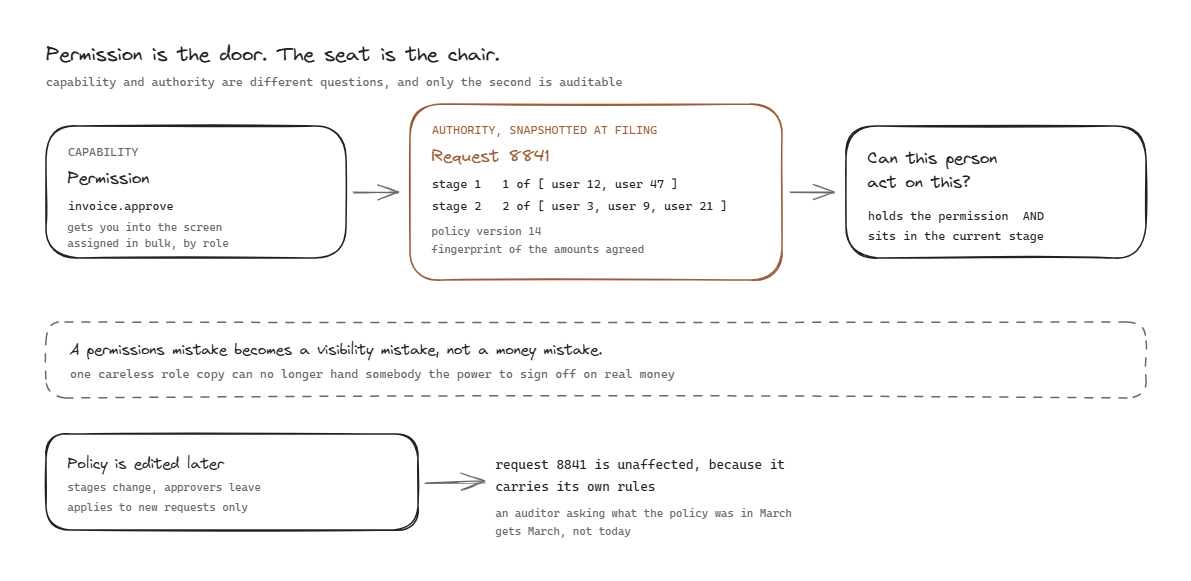
When a request is filed, copy the entire governance into it: the stages, how many approvals each stage needs, and the specific people eligible at that moment.
request 8841
  stage 1  needs 1 of [user 12, user 47]        filed with these names
  stage 2  needs 2 of [user 3, user 9, user 21]
  policy_version 14
The request now carries its own rules. Later edits to the policy apply to new requests only, and nothing in flight silently changes shape.
Without this, a policy edited on Tuesday rewrites the meaning of everything filed on Monday, and the answer to question three becomes “whatever the policy says today”, which is not an answer.
Snapshot the people, not the role. Somebody who has since changed jobs was still the right approver in March, and a role lookup at read time will say they were not.
Verify: file a request, change the policy, and confirm the request still shows the original stages and names.
Step 2. Make the decision log the truth
An append only table of events. Nothing in it is ever updated or deleted.
request_events
  id, request_id, seq, type, actor_id, at, payload

FILED       by 88
CLAIMED     by 12
APPROVED    stage 1, by 12, comment
ESCALATED   stage 2, by system, reason: sla_breach
APPROVED    stage 2, by 3
APPLIED     effect_reference: ledger entry 99213
Status is then a projection over that log, not a column somebody writes. If a status is ever wrong, it can be recomputed. If a status column is wrong, it can only be guessed at, which is how you end up with a repair script that has to decide what probably happened.
Keep a materialised status column for query performance if you need one, but treat it as a cache and be able to rebuild it from the log at any time. The test is simple: can you drop and recompute the column and get identical results.
Step 3. Fingerprint what was actually agreed
A request is a description of an intended effect. Between filing and approval, the world moves.
Somebody requests a refund of a balance. Three days pass. The balance has changed. Approving now applies an effect nobody agreed to.
So compute a fingerprint of the material facts at filing, and recheck it at the moment of applying.
at filing:   fingerprint = hash(amount, target_id, balance_at_filing, line_items)
at applying: recompute, compare
             different -> stop, show precisely what changed, require re-approval
The failure without this is quiet and specific: the approval is valid, the log is honest, and the effect is wrong. This is the guarantee that turns an approval into a decision about a known thing.
Verify: file a request, alter the underlying data, then approve. It must refuse and say what changed.
Step 4. Commit the effect and the decision together
The approval, the effect it authorises, and any outbound message all commit in a single transaction keyed by an idempotency key.
BEGIN
  INSERT APPROVED event
  apply the effect
  INSERT APPLIED event with the effect reference
  INSERT outbox row for the notification
COMMIT
Never send the notification inside the transaction. If the send succeeds and the transaction rolls back, somebody has been told about something that did not happen, and they have the message to prove it. Write the intent, commit, deliver separately.
Idempotency matters because approve is a button, and buttons get double clicked on a slow connection.
Step 5. Escalate on time, never approve on time
Deadlines live in the database, not only in a delayed queue entry. If the queue is flushed, a sweep re-arms every ladder from the stored deadline.
A reasonable ladder:
+4h    remind the current stage
+12h   widen the eligible pool within the stage
+24h   escalate to the named fallback
+48h   raise a visible breach
never  auto approve
The reason auto approval is never acceptable is worth stating plainly, because it gets proposed regularly as a pragmatic convenience: the system would approve the most during the period when everybody is busiest, which is exactly the period when the approvals most need a human.
Step 6. Let a decision be claimed
Without this, two approvers open the same request, both act, and either you have a double effect or one of them gets an error after committing to a decision.
Claiming is a soft lock: visible to others, released automatically after a timeout so it cannot become a permanent block, and recorded in the log because who picked something up is itself useful.
Step 7. Make refusal explain itself
When somebody cannot act, say which reason applies. Not “not authorised”.
You filed this request.
This is at stage 2 and you sit in stage 1.
Your authority limit is below this amount.
This action is currently suspended by an administrator.
Four different causes, four different next actions. A generic denial produces a support ticket every time, and the information needed to answer it is already in the system.
What this costs
Snapshots make requests larger and mean policy improvements do not apply retroactively, which is usually what you want and occasionally frustrating. The event log grows and needs an archival plan. Fingerprinting means legitimate small changes require re-approval, which people will complain about until the first time it catches something real.
All of it is worth paying the moment the actions are irreversible and involve money or somebody’s record. None of it is worth paying for a workflow that publishes a blog post.
What good looks like
Any request can be replayed from its log. The policy in force on any past date is recoverable from the request itself. Nothing has ever been applied against data that changed after it was agreed. And when an auditor asks the four questions, the answer is a query rather than a project.
Questions people actually ask
- Why snapshot instead of reading the policy live?
- Because policy changes. If a request reads live policy at decision time, then editing the policy retroactively changes the meaning of every request in flight, and an auditor asking what the rule was in March gets today's answer.
- Why is a status column not enough?
- Because a status column holds the current state and nothing about how it was reached. It can also be corrupted by a half finished migration or a cron job, and once it is wrong there is nothing to recompute it from.
- Should approvals ever expire into approval?
- Never. A system that approves on timeout approves the most during the busiest week of the year, which is exactly when nobody is checking. Escalate, widen, notify harder, raise a breach. Never yes.