Solution
How to stop one website being four websites
Most sites are quietly served at four or more addresses. The content is identical, the URLs are not, and a crawler treats each one as a separate page competing with the others.
The short answer
Choose one canonical form, https and one hostname, then 301 every other variant to it at the edge where TLS terminates. A canonical tag is a hint that can be ignored. A 301 is an instruction. Emit both and rely on the redirect.
The problem, stated precisely
A website is not a set of pages. To a crawler it is a set of URLs, and two URLs serving identical bytes are two pages that compete with each other.
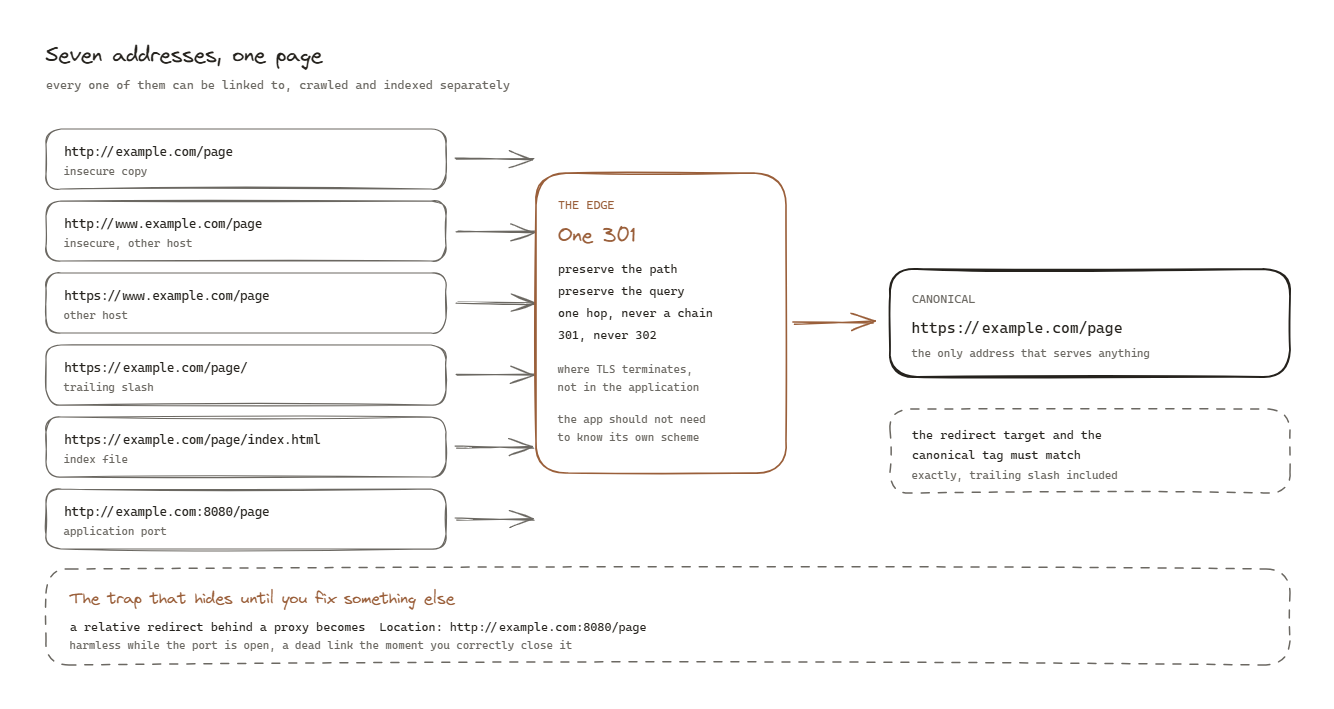
Most sites are reachable at more addresses than their owners realise:
http://example.com/page
https://example.com/page
http://www.example.com/page
https://www.example.com/page
https://example.com/page/          trailing slash
https://example.com/page/index.html
http://example.com:8080/page       the application port, if it is exposed
That is seven addresses for one page. Every one of them can be linked to, crawled, and indexed separately.
What it actually costs
Signals split. Links, engagement and authority accumulate against whichever URL each visitor happened to use. Four addresses can mean a quarter of the strength each instead of one strong page.
Crawl budget is wasted. A crawler spends its allocation fetching the same content repeatedly instead of finding pages it has never seen. On a large site this is the dominant cost.
The wrong variant can win. Search engines pick a canonical themselves when you have not made it obvious. They sometimes pick the insecure one, or the one with the ugly parameters, and that is the URL that appears in results.
Plain HTTP is a security problem, not only an SEO one. Anything on the path can read it, and anything on the path can modify it.
The hierarchy of fixes
Three tools, and they are not equivalent.
A 301 redirect is an instruction. The URL is gone and this is where it went. It moves real users, passes ranking signal, and cannot be ignored.
A canonical tag is a hint. It says “prefer this version”. Search engines usually respect it and are free not to, particularly when other signals disagree.
Nothing leaves the decision to the crawler.
Emit the canonical tag, because it handles cases a redirect cannot, such as tracking parameters and syndicated copies. But fix the problem with redirects.
Step 1. Choose the canonical form and write it down
Four decisions, made once:
scheme          https, always
hostname        example.com  OR  www.example.com, pick one
trailing slash  present OR absent, pick one
index files     never expose /index.html
Whether you choose www is genuinely irrelevant for ranking. What matters is that one of them is chosen and the other redirects. The only practical argument is that some DNS providers cannot put a CNAME at a bare apex, which occasionally forces the www form.
The one rule that catches people: your redirect target and your canonical tag
must agree exactly, including the trailing slash. If the server redirects to
/page and the page emits a canonical of /page/, you have told a crawler two
different things and it will believe neither.
Step 2. Redirect at the edge, in its own server block
The edge is wherever TLS terminates. In nginx that means one block for port 80 that does nothing but redirect, and one block for 443 that serves.
server {
    listen 80;
    server_name example.com;
    return 301 https://example.com$request_uri;
}

server {
    listen 443 ssl;
    server_name example.com;
    # certificate, then the site
}
$request_uri preserves the path and the query string. Redirecting everything to
the home page instead is a common shortcut that destroys every deep link you have
ever earned.
Do this at the edge rather than in the application. The application should not have to know what scheme it is being served over, and if it is behind a proxy it does not reliably know anyway.
The traps
The configuration is four lines. The traps are what actually take the time, and I have hit all five.
Trap 1. One server block listening on both 80 and 443
This is the most common cause by a wide margin, and it usually arrives via a
certificate tool. Those tools add listen 443 ssl and the certificate paths to
your existing block. Unless you explicitly ask for a redirect, they leave
listen 80 exactly where it is.
The result is a single block serving both schemes happily, with no redirect anywhere. Everything looks configured. Nothing is.
server {
    server_name example.com;
    listen 80;            # <- still here, still serving
    listen 443 ssl;       # <- added by the tool
}
The fix is splitting them, and that is all.
Trap 2. A blanket redirect breaks certificate renewal
Automated certificate issuance commonly validates over plain HTTP. Redirect every path on port 80 with no exception and validation can no longer complete.
The failure is silent. Nothing breaks on the day you make the change. The certificate expires weeks later and the site goes down with a browser warning, which is the least convenient possible way to discover a configuration mistake.
Check which validation method you use before you touch port 80. If it works by temporarily modifying the server config, a redirect is fine, because an exact match location beats a prefix match in nginx precedence. If it works by writing files to a directory, that directory needs an explicit carve out above the redirect:
location ^~ /.well-known/acme-challenge/ {
    root /var/www/html;
}
Trap 3. The application port is publicly bound
If your application runs in a container and the port is published on all interfaces, the site is reachable directly on that port, bypassing the edge entirely. No TLS, no redirect, none of your headers.
That is another complete copy of the site at another address, and it is the one nobody thinks to check because it is not a hostname anybody would type.
Bind to the loopback interface, and point the proxy at loopback too:
ports:
  - "127.0.0.1:8080:80"     not  "8080:80"
Change the proxy target first, confirm the site still works, then change the binding. In the other order the site is down between the two steps.
Trap 4. Relative redirects leak the internal port
This one is subtle, it is invisible until something else changes, and it is the one I would not have predicted.
When you write a relative redirect, nginx expands it into an absolute URL before sending it, using what it knows: its own scheme, the Host header, and its own listen port. Behind a proxy that terminates TLS, all three are wrong.
you write        return 301 /new-page;
nginx sends      Location: http://example.com:8080/new-page
Wrong scheme, and an internal port. While that port is publicly reachable the link still resolves, so everything appears to work and the fault sits there unnoticed. The moment you correctly close the port, as in trap three, every one of those redirects becomes a dead link.
Two problems arriving together, where fixing the first exposes the second.
absolute_redirect off;
That makes nginx emit Location: /new-page and let the browser resolve it
against the original request. Correct regardless of what sits in front, and the
container needs to know nothing about the edge.
Trap 5. HSTS shipped too early
Strict-Transport-Security tells a browser never to attempt plain HTTP for this
host again, for the duration you specify. It is the right thing to have.
It is also the one header you cannot take back. Ship a two year max-age against a redirect that is subtly wrong and every returning visitor is locked out for two years, with no mechanism to reach them.
Start short. Verify. Then raise it.
add_header Strict-Transport-Security "max-age=300" always;
# after a day of confidence:
# add_header Strict-Transport-Security "max-age=63072000; includeSubDomains" always;
Step 3. Verify by reading headers, not by loading pages
A browser follows redirects silently and shows you the destination. That hides
both the status code and the Location header, which are the only two things you
are actually checking.
curl -sI http://example.com/some-page | head -3
Four things must be true, and it is worth checking each rather than glancing:
Status is 301, not 302. A 302 says temporary, and a crawler treats it as such, so the old URL keeps its signal and the situation never resolves.
The Location is the canonical scheme and host. Not the internal port, not the other hostname.
The path survived. /some-page must arrive at /some-page, not at /.
It is one hop. Chains work for users and lose a little at every step, and they burn crawl budget. Check with:
curl -s -o /dev/null -L -w '%{url_effective} %{http_code} %{num_redirects}\n' http://example.com/some-page
That should print the canonical URL, 200, and 1.
Step 4. Make the check automatic
Everything above is a state that decays. A certificate tool re-run, a container rebuild, a config restored from an old backup, and you are back where you started, silently.
So assert it in your deployment pipeline against the live site:
location=$(curl -sI http://example.com/some-page | grep -i '^location:' | tr -d '\r' | cut -d' ' -f2-)
test "$location" = "https://example.com/some-page"
Two notes from getting this wrong myself. Assert the destination, not just the status code, or a 301 to a broken URL passes. And assert on the exit code when checking that something is unreachable, because a connection failure and an HTTP status are different kinds of answer, and conflating them produces a test that can never pass. A permanently failing check is worse than none, because it teaches you to ignore the pipeline.
What good looks like
One address serves the site. Every other variant returns a single 301 to it, preserving the path. The canonical tag on every page matches the URL that serves it, exactly. The application port is not reachable from outside. HSTS is set and was raised only after the redirect was proven. And a check in the pipeline fails loudly the day any of that stops being true.
Questions people actually ask
- Is a canonical tag enough on its own?
- No. A canonical tag is a hint a search engine may ignore, especially when it conflicts with other signals. A 301 is an instruction that also moves real users and passes ranking signal. Emit the tag, but fix the problem with redirects.
- Should I use www or no www?
- It genuinely does not matter for ranking. What matters is picking one and redirecting the other. The only practical argument either way is that a bare domain cannot carry a CNAME at the apex on some DNS providers, which occasionally forces the www form.
- Does serving the site over plain HTTP actually hurt?
- Yes, in three ways. It is a second address for identical content, it is unencrypted so anything in the path can read or modify it, and browsers increasingly mark it as not secure, which affects the humans you were trying to reach.
- What if my certificate only covers one hostname?
- Then do not add a server block for the other one. A hostname with a server block but no matching certificate produces a TLS error, which is worse than that hostname simply not resolving. Expand the certificate first, then add the redirect.
- How do I know it is actually fixed?
- Read the response headers rather than loading the page in a browser. A browser follows redirects silently and shows you the destination, which hides both the status code and the Location header, and those two are the entire thing you are checking.