Solution
How to change a database schema while people are using it
The migration that takes the site down is rarely the complicated one. It is the single line rename that somebody ran on a Friday because it was obviously safe.
The short answer
Never change a column in one step. Expand by adding the new shape alongside the old, migrate by writing to both and backfilling in batches, then contract by removing the old shape only once nothing reads it. Each phase deploys separately and each is independently reversible.
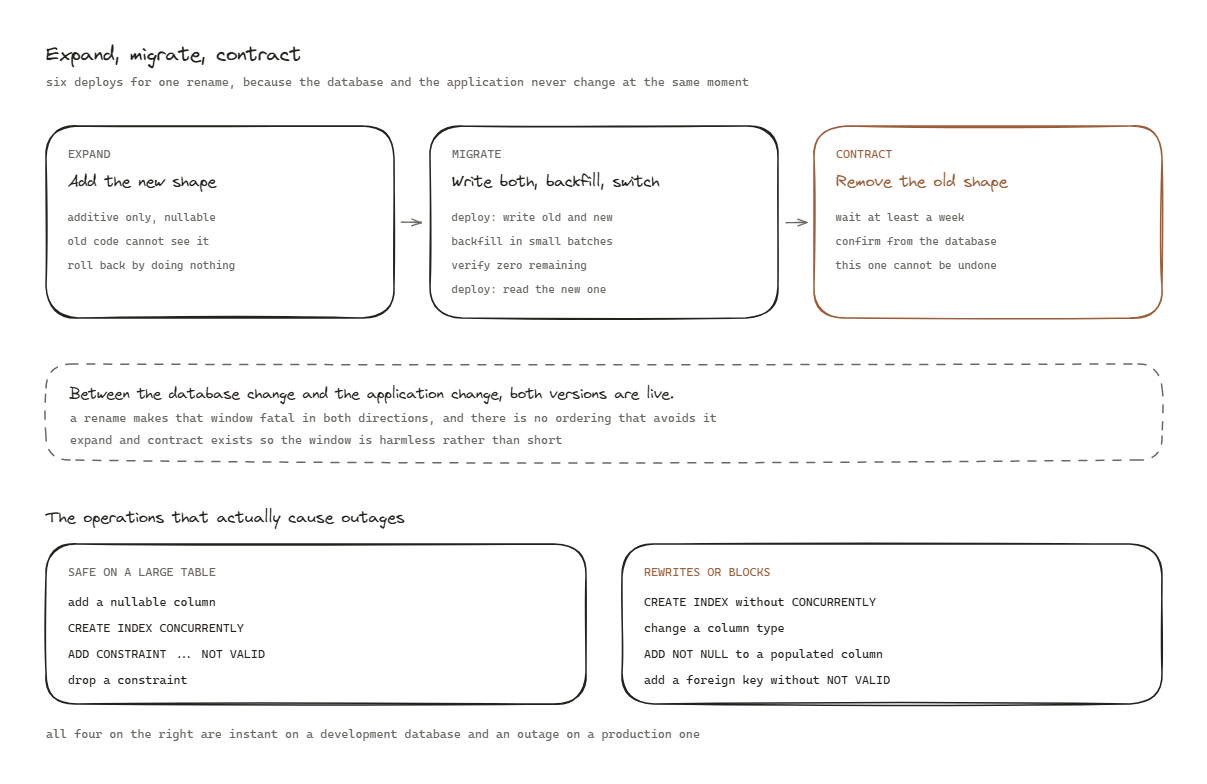
Why one step never works
A deploy is not atomic. The database changes at one moment and the application changes at another, and between those two moments both versions are live.
Rename customer_name to full_name in a single migration and you have a window where old code
selects a column that no longer exists. Deploy the code first and you have the same window in the
opposite direction. There is no ordering that avoids it, because the problem is the gap, not the
sequence.
The answer is to never let old and new be mutually exclusive. That is the whole idea behind expand, migrate, contract.
Phase 1. Expand
Add the new shape. Change nothing about the old one.
ALTER TABLE customers ADD COLUMN full_name text;
Rules for this phase, all of them absolute:
- Additive only. No renames, no drops, no type changes.
- Nullable, or with a default that does not rewrite the table. In modern Postgres a default on a new
column is metadata only, but a
NOT NULLon a populated table without a default is a full rewrite and a long lock. - No constraint that existing rows would violate, because validating it locks the table.
After this deploys, the old application is completely unaffected. It does not know the column exists. That is the property that makes the phase safe, and it is why this phase can be rolled back by doing nothing at all.
Verify: deploy expand alone and leave it for a full day under real traffic before continuing. If anything is going to be upset by the new column, you want to find out while the old path is still the only path.
Phase 2. Migrate
Two things happen here, and the order within them matters.
Write to both
Deploy application code that writes the old and the new column on every insert and update, while still reading from the old one.
INSERT: write customer_name AND full_name
UPDATE: write customer_name AND full_name
READ:   still customer_name
Now every new row is correct in both places. The old code, if any is still running, continues to work because the old column is still being maintained.
Backfill the history, in batches
The existing rows still need the new column. Do this in small batches, never in one statement.
UPDATE customers
SET full_name = customer_name
WHERE full_name IS NULL
  AND id IN (
    SELECT id FROM customers WHERE full_name IS NULL ORDER BY id LIMIT 1000
  );
Loop that with a pause between iterations. Three reasons the batching is not optional:
- A single
UPDATEover millions of rows holds one enormous transaction, bloats the table, and can block other writers. - It can be killed at any point and resumed, because the
WHERE full_name IS NULLmakes it naturally restartable. - Replication lag stays flat, which matters because a replica that falls minutes behind is a read path serving stale data to real users.
Watch replication lag rather than the clock. If lag rises, increase the pause. The backfill taking six hours instead of two is not a problem. A replica four minutes behind is.
Then switch the reads
Once the backfill is complete and verified, deploy the read switch as its own change.
-- verify first, and expect exactly zero
SELECT count(*) FROM customers WHERE full_name IS NULL AND customer_name IS NOT NULL;
Only when that returns zero does the application start reading the new column. It is still writing both, so this change is reversible by reverting one deploy.
Phase 3. Contract
Remove the old shape. This is the phase people rush, and it is the one that cannot be undone.
Wait longer than feels necessary. At least one full deploy cycle after the read switch, ideally a week. The reason is that reads come from more places than anybody remembers: a report, an export, an admin script, a scheduled job that only runs monthly.
Before dropping, confirm nothing reads it. Search the codebase, then check the database itself:
SELECT schemaname, relname, seq_scan, idx_scan
FROM pg_stat_user_tables WHERE relname = 'customers';
Then, and only then:
ALTER TABLE customers DROP COLUMN customer_name;
The locks that actually cause outages
Worth knowing by heart, because the dangerous ones look harmless.
Safe on a large table: adding a nullable column, adding an index concurrently, dropping a
constraint, adding a check constraint as NOT VALID and validating it separately.
Dangerous: adding an index without CONCURRENTLY, which blocks writes for the whole build.
Changing a column type, which rewrites the table. Adding NOT NULL to a populated column, which scans
it under a lock. Adding a foreign key without NOT VALID, which locks both tables.
CREATE INDEX CONCURRENTLY ...            -- safe, slower, cannot run in a transaction
ALTER TABLE ... ADD CONSTRAINT ... NOT VALID;   -- takes a brief lock
ALTER TABLE ... VALIDATE CONSTRAINT ...;        -- scans without blocking writes
CONCURRENTLY cannot run inside a transaction block, which most migration tools wrap around
everything by default. That single detail catches people constantly, and the failure is that the
migration silently takes the blocking path instead.
In a multi-tenant system with a database per tenant
Everything above, multiplied, plus one rule: the migration must be idempotent and resumable, because running it across many databases will fail partway at some point.
Track which tenants have been migrated in a table, run in waves, and start with your own internal tenant. A migration that cannot be safely re-run is a migration that will leave your estate in a mixed state the first time a connection drops.
The checklist
- Expand. Additive only. Deploy alone and wait.
- Write to both. Deploy. Verify new rows are correct in both places.
- Backfill in batches, watching replication lag.
- Verify the backfill returns zero remaining.
- Switch reads. Deploy alone.
- Wait at least a week and confirm nothing reads the old shape.
- Contract.
Six deploys for one rename. That is the actual cost of not taking the site down, and it is cheap compared to the alternative.
Questions people actually ask
- Why can a rename not be done in one step?
- Because the application and the database deploy at different moments. For a window of seconds or minutes, one version of the code is running against the other version of the schema, and a rename makes that window fatal in both directions.
- What makes a migration dangerous?
- Taking a lock that blocks reads or writes on a large table, and rewriting a whole table. Both are invisible on a small development database and both are an outage on a large production one.
- How large should a backfill batch be?
- Small enough that any single batch can be killed without consequence, and slow enough that replication lag stays flat. Start at a thousand rows with a pause between batches, and watch the lag rather than the clock.